JPEG vs. PNG vs. WebP: Which Image Format Should You Use?
Choosing the right image format is crucial for website performance, user experience, and SEO. With multiple options available, understanding the differences between JPEG, PNG, and WebP can help you optimize your visuals effectively. Let’s explore each format’s strengths, weaknesses, and ideal use cases to help you make the best choice for your needs.
JPEG: The Best Choice for Photographs
JPEG (Joint Photographic Experts Group) is the most widely used format for photographs and complex images. It uses lossy compression, meaning it reduces file size by slightly lowering image quality—a trade-off that works well for high-color images like photos, product shots, and detailed graphics. JPEGs are perfect when you need a small file size without drastically compromising visual quality. They’re supported by all browsers and devices, making them a safe choice for general use.
However, JPEGs don’t support transparency, so they’re not ideal for logos or graphics requiring a transparent background. Additionally, excessive compression can lead to visible artifacts (blurry or pixelated areas). If your priority is fast-loading, high-quality images for blogs, social media, or e-commerce, JPEG is a reliable option—but consider balancing compression to avoid noticeable quality loss.

PNG: The Go-To for Transparency & Sharp Graphics
PNG (Portable Network Graphics) is a lossless format, meaning it retains full quality even after compression. Unlike JPEG, PNG supports transparency, making it perfect for logos, icons, and graphics with sharp edges or text. Because it doesn’t lose detail during compression, PNG is excellent for screenshots, infographics, and any image where clarity is essential.
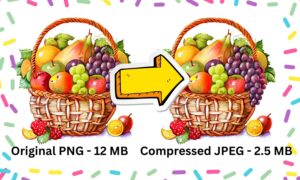
The downside? PNG files are larger than JPEGs, which can slow down page loading if overused. They’re also unnecessary for photographs since JPEG or WebP can achieve similar visual quality with smaller file sizes. Use PNG when you need crisp text, transparency, or lossless quality, but avoid it for large photo galleries where file size impacts performance.
WebP: The Modern, High-Efficiency Alternative
WebP: The Modern, High-Efficiency Alternative
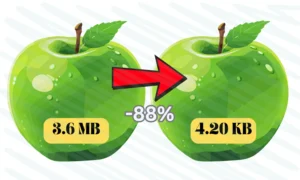
Developed by Google, WebP combines the best of JPEG and PNG while offering superior compression. It supports both lossy and lossless compression, transparency (like PNG), and typically reduces file sizes by 25-35% compared to JPEG and PNG without sacrificing quality. This makes it an excellent choice for fast-loading websites, especially those prioritizing Core Web Vitals and SEO.
The only drawback is browser compatibility. While most modern browsers (Chrome, Firefox, Edge) support WebP, some older versions (like Safari before iOS 14) may not. The solution? Use WebP with a fallback (serving JPEG/PNG for unsupported browsers). Tools like WordPress plugins, CDNs, and image converters can automate this process. If your audience uses up-to-date browsers, WebP should be your default choice for both photos and graphics.
Which Format Should You Use?
-For photographs & high-color images: JPEG (or WebP if possible).
– For logos, transparent images, or sharp graphics:PNG (or WebP if transparency is needed with better compression).
– For the best performance (modern websites):WebP (with fallbacks for compatibility).
Final Thoughts
There’s no one-size-fits-all answer—the best format depends on your specific needs. JPEG remains a safe, universal choice for photos, while PNG excels for graphics requiring transparency. WebP, however, offers the best balance of quality and performance for modern websites. By strategically choosing the right format (and optimizing further), you can boost page speed, improve SEO, and enhance user experience.
Are you currently using WebP, or do you still rely on JPEG/PNG? Share your thoughts—or ask any questions—below!
Recent Post